What a meeting bot is, and why people are banning them
Somebody joins your call named "Fireflies Notetaker" or "Otter Pilot" and nobody invited them. Half the participants glance at the guest list and say nothing.
That is a meeting bot. It is worth knowing what it actually is, because the awkwardness people feel about it turns out to be well founded.
What it is
A meeting bot is a real account that joins your call like a person does. It has a name, it appears in the participant list, and it records the audio and video it receives. That recording goes to the vendor's servers, gets transcribed there, and comes back as notes.
It is not listening from your computer. It is a separate attendee, connected from somewhere else, receiving the same stream everybody else receives.
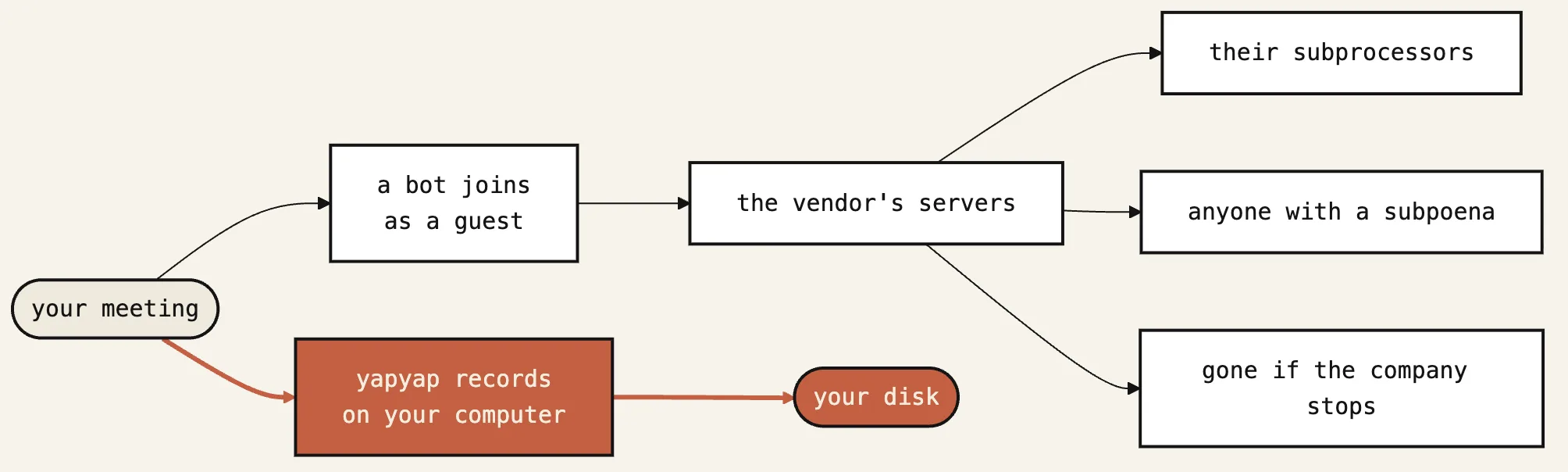
Two consequences follow. It only captures what the call platform sends it, so anything said in the room but not through the call is lost. And it needs to be admitted, which means somebody has to let a stranger's software into the meeting.
Why people ban them
Four reasons, roughly in the order you will encounter them.
Consent gets complicated. Everybody can see the bot, which is honest. But the person who did not consent now has to object out loud, in front of colleagues, at the start of a meeting. Most people will not do that, so visible does not mean agreed.
Legal and IT teams object to the data path. The recording leaves the organisation and lands with a vendor nobody vetted. In regulated work that needs a written agreement with the supplier, and in Europe it needs a lawful basis and a processing agreement. An employee adding a bot on their own is a compliance problem before it is anything else.
Clients notice. In sales calls, consulting and any external meeting, a bot on the guest list is a decision you made about their words without asking.
They break the room. The bot changes how people talk. Candour drops, and the meeting you wanted to record is not the meeting that happens.
Plenty of companies now block them outright at the platform level. If your bot keeps failing to join, that may be why rather than a bug.
Two ways to get notes without one
Record from your own computer. The audio going into your speakers and the audio from your microphone are both available on the machine you are already sitting at. Capture there and no guest appears, because nothing joined the call. This works in Zoom, Google Meet, Teams and anything else, since the capture sits below the application.
Use the platform's own recording. Meet, Teams and Zoom all record natively, with the host's consent flow built in. This is the least surprising option in a corporate setting. The recording lands in that company's cloud, which may or may not be the outcome you want.
The first option is the one people usually mean by "no bot". It also captures the room, so an in-person conversation records the same way a call does.
Still tell people you are recording
Removing the bot removes the visible marker, which puts the disclosure back on you.
Say it at the start. "I am recording this so I can write it up properly, is that alright with everybody." One sentence, and it does the job the bot was doing badly.
In some places you are legally required to have that conversation, and the rules differ by country and sometimes by state. Check your own rather than a blog post's.
Where to go next
For the step-by-step version, see recording a Google Meet without a bot or recording Teams without a notetaker guest.
yapyap records from your computer, transcribes and labels speakers locally, and never joins your call. The guest list stays exactly as you left it.
yapyap records, transcribes, and summarizes on the hardware you already own. No account, no subscription.
Free to try. No card, no account.
Then €69, once. Yours forever, every update included.
Your recordings never leave your computer.